Update v1.64 submitted to the App Store
February 15, 2016 - Reading time: ~1 minute
Update: Approved and released 2/24/16
Submitted: 2/16/16
What's New:
added lab sharing via email and AirDrop
updated show power inline to calculate for detected phones
added line console commands:
password WORD
no password
login
no login
added command prompt commands:
ipconfig /release
ipconfig /renew
fixed banner issue to remove delimiter on multi-line banner text
fixed subinterface status on show ip interface brief
-----------------
Note on the sharing of files:
iMessage allows for sending custom files, but it will not open on the receiving end. Further, research results in custom files via iMessage not being a possibility. It is a limitation locked by Apple that we can't do anything about. The iMessage share option will be removed on the next update.
Subnet practice questions now available
January 30, 2016 - Reading time: ~1 minute

The IOS Network Simulator now includes subnet practice questions. These are randomly generated resulting in an unlimited variety to test your skills. Find the new feature under tools.
Tip: You should be able to answer these types of questions within a minute before taking the CCNA certification exams.
VoIP support via simplified CME
January 29, 2016 - Reading time: ~1 minute
A simplified CME is available to configure the VoIP phones and simulate calls.
Please keep these points in mind when configuring a scenario that includes phones:
- The DHCP server option 150 address pointing to the TFTP server must be the CME router.
- The configured ip source-address for the telephony service is the CME router.
- The TFTP server/router is assumed to serve the correct phone files.
- VoIP phones must receive IP addresses via DHCP. Ensure a DHCP server is properly configured, as IP addressing is required for phone registration.
Configure the ephone and ephone-dn and you're all set. Happy networking!
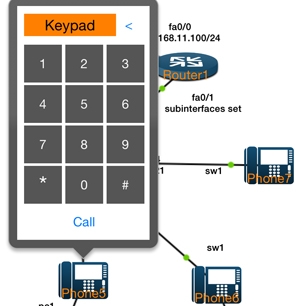
*Get the mac address of the phones from the DHCP server by running the command:
Router#show ip dhcp binding
More information on a crash log needed
January 23, 2016 - Reading time: ~1 minute
Someone is sending a crash log with regards to the command:
Switch0#show ip interface brief
The log has no comments or email address to communicate with the user. We would like to get whatever is wrong fixed, but we are having a hard time recreating the issue. The log shows that you are using an external keyboard. Please contact us via our support page if the problem persists.
Apologies for the blog post, this is the only way we can think of to possibly get a hold of the user.
Update v1.63 submitted to the App Store
January 20, 2016 - Reading time: ~1 minute
Update: Approved and released 1/29/16
Submitted: 1/20/16
What's new:
added VoIP phone device
added subnetting practice questions under tools
added CME global VoIP commands:
telephony-service
ephone-dn <1-150>
ephone-dn <1-150> dual-line
no ephone-dn <1-150>
ephone <1-30>
no ephone <1-30>
added telephony service commands:
max-dn <1-150>
max-ephones <1-30>
ip source-address A.B.C.D
no ip source-address A.B.C.D
added config ephone commands:
mac-address H.H.H
no mac-address
button LINE
added config ephone-dn command: number WORD
updated phone logic to handle dual-line calls
updated active phone line to be held when another call is answered
added option to resume call and put the other call on hold
updated DHCP process to handle subinterfaces
updated ciscoNeighborsFromDevice to detect phones
updated cdp neighbor to display the hostname and not the device type
added phone actions: reset, answer, hangup, and resume call
added phone in layer 2 logic
Update v1.62 submitted to the App Store
January 6, 2016 - Reading time: ~1 minute
Update: Approved and released 1/11/16
Submitted: 1/5/16
What's new:
updated show vlan brief to display interfaces on voice vlans
targeted help definition started
fixed interface vlan 1 and interface loopback issue
fixed dhcp lease command
fixed tab issue after a space