Version 2.22 Adds WLC Support
March 28, 2026 - Reading time: ~1 minute
Wireless labs have arrived in PocketCLI.
You can now add a Wireless LAN Controller (WLC) and Access Points (APs) to your topology and configure them through the CLI.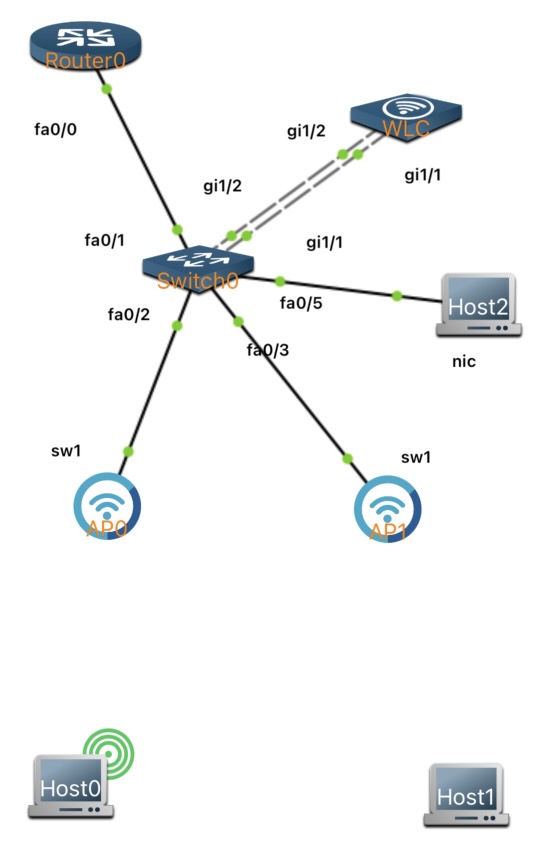
For this initial release, keep these limitations in mind:
- WLC and APs should be placed on the same network
- Only one WLC per lab is currently supported
- The available wireless command set is still limited and will expand over time
- For now, the wireless management interface must be configured on a VLAN interface.
This release includes support for
- Basic WLC show commands
- WLAN creation and security settings
- Policy profiles and policy tags
- AP tag assignment
- Basic AP CAPWAP configuration commands
As with the rest of PocketCLI, all wireless configuration is handled entirely through the command line. A guided tutorial for WLC and AP setup is coming soon.
Branch Office — Static NAT + PAT + ACLs
December 10, 2025 - Reading time: 4 minutes
In the previous lessons, you were introduced Static NAT with port restrictions for secure inbound access to internal services. After that we covered PAT (Port Address Translation) for outbound internet access from multiple inside hosts.
In this lesson, we combine these concepts into a single, branch office edge router configuration.
MultiLink PPP (MLPPP)
November 21, 2025 - Reading time: 5 minutes
MultiLink PPP (MLPPP), also known as PPP Multilink or MLP, is a protocol that allows multiple physical WAN links to be logically bundled into a single virtual multilink interface. Functionally, you can think of MLPPP as “EtherChannel for router serial links”: it combines the bandwidth of several individual links into one logical pipe, provides load balancing across those links, and maintains packet sequencing to avoid data corruption. Because MLPPP is an IETF standard, it ensures interoperability between devices from different vendors. In this lab, you will build a two-link MLPPP bundle between two Cisco routers and verify its operation.
Renew CCNA/CCNP for Free
November 3, 2025 - Reading time: 4 minutes
How I’m (Happily) Stacking Free CE Credits to Keep My CCNA/CCNP Fresh
If you’re like me—always tinkering with labs, skimming articles over coffee, and squeezing in learning between projects—then Continuing Education (CE) credits are your best friend. They’re the easiest win you’ll get: keep your certifications active, grow your skills, and yes… do it all online for free.
Here’s how I’ve been taking advantage of CE credits and how you can, too.
Modifying EtherChannels
October 15, 2025 - Reading time: 4 minutes
In the previous lesson, we focused on the fundamentals of EtherChannel by bundling multiple interfaces using LACP in active mode. In this lesson, we will build on that foundation by adding an additional interface to our existing EtherChannel and converting the LACP configuration to static “on.” These two tasks will help you deepen your understanding of EtherChannel’s flexibility. By following along, you will see how to expand and adapt a port-channel configuration to suit different requirements.
EtherChannels
September 30, 2025 - Reading time: 4 minutes
EtherChannel, also known as Port-Channel, is a technology that combines multiple physical switch ports into one logical interface. This bundling increases bandwidth while providing redundancy if one physical link fails. Configuration options include modes that automatically negotiate channels (such as LACP) or statically configure them. It is widely used between switches to ensure higher throughput and fault tolerance.